- Detalls
Features:
- Set the scroll speed of the images
- Set background repeat style
- Set background image size, 100%, cover, contain, etc
- Set custom backgrounds for all s5 rows in the framework.
- Enable or disable parallax on a per row basis
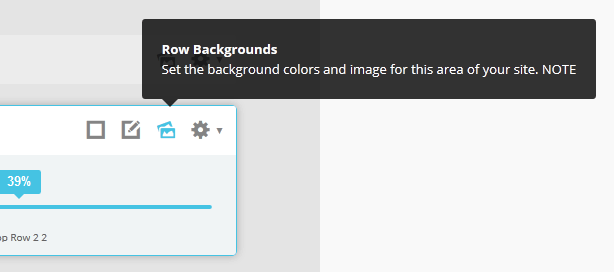
Admin Area Of The Backgrounds Tab:
- Detalls
This is a sample blockquote. Use <blockquote><p>Your content goes here!</p></blockquote> to create a blockquote.
This is an image with the "boxed" class applied:

This is an image with the "boxed_black" class applied:
This is an image with the "padded" class applied:
This is an image with the "full_width" class applied. This can also be done automatically in the template configuration. Be sure to review our Vertex Guide here for other full width image options.

Heading 1
Heading 2
Heading 3
Heading 4
Heading 5
<a> With readon_highlight1 class applied:
readon_highlight1
<a> With readon_highlight2 class applied:
readon_highlight2
<a> With highlight1_button class applied:
highlight1_button
<a> With highlight2_button class applied:
highlight2_button
<span> With highlight1_text class applied:
highlight1_text
<span> With highlight2_text class applied:
highlight2_text
<span> With uppercase_letters class applied:
uppercase_letters
#s5_code { width: 30px; color: #fff; line-height: 45px; }
- This is an Ordered List
- Congue Quisque augue elit dolor nibh.
- Condimentum elte quis.
- Opsum dolor sit amet consectetuer.
- This is an Unordered List
- Congue Quisque augue elit dolor nibh.
- Condimentum elte quis.
- Opsum dolor sit amet consectetuer.
- This is an Unordered List with class plus
- Congue Quisque augue elit dolor nibh.
- Condimentum elte quis.
- Opsum dolor sit amet consectetuer.
- This is an Unordered List with class ul_arrow
- Congue Quisque augue elit dolor nibh.
- Condimentum elte quis.
- Opsum dolor sit amet consectetuer.
- This is an Unordered List with class ul_star
- Congue Quisque augue elit dolor nibh.
- Condimentum elte quis.
- Opsum dolor sit amet consectetuer.
- This is an Unordered List with class ul_bullet
- Congue Quisque augue elit dolor nibh.
- Condimentum elte quis.
- Opsum dolor sit amet consectetuer.
The following list will support lists up to number 9, add the following class to the UL wrapping the below LI elements, class="ul_numbers":
- This is a sample styled number list <li class="li_number1">Your content goes here!</li>
- This is a sample styled number list <li class="li_number2">Your content goes here!</li>
- This is a sample styled number list <li class="li_number3">Your content goes here!</li>
- This is a sample styled number list <li class="li_number4">Your content goes here!</li>
<div class="s5_pricetable_3">
<div class="s5_pricetable_column">
<div class="s5_pricetable_column_padding">
<div class="s5_title">Basic</div>
<span class="dollarsign">$</span><span class="price">49</span><span class="month">/per month</span>
<div class="s5_options">
Unlimited Space & Traffic<br>
99.9% Server Uptime<br>
24/7 Customer Care<br>
30 Days Money Back<br><br>
</div>
<div class="s5_horizontalrule"></div>
<div class="s5_buttoncenter"><a class="button s5_pricetable" href="#">Choose</a></div>
</div>
</div>
<div class="s5_pricetable_column recommended">
<div class="s5_pricetable_column_padding">
<div class="s5_title">Standard</div>
<span class="dollarsign">$</span><span class="price">79</span><span class="month">/per month</span>
<div class="s5_options">
Unlimited Space & Traffic<br>
99.9% Server Uptime<br>
24/7 Customer Care<br>
30 Days Money Back<br>
FREE Domain Name<br>
Personal Concierge
</div>
<div class="s5_horizontalrule"></div>
<div class="s5_buttoncenter"><a class="button s5_pricetable" href="#">Choose</a></div>
</div>
</div>
<div class="s5_pricetable_column">
<div class="s5_pricetable_column_padding">
<div class="s5_title">Premium</div>
<span class="dollarsign">$</span><span class="price">99</span><span class="month">/per month</span>
<div class="s5_options">
Unlimited Space & Traffic <br>
99.9% Server Uptime<br>
24/7 Customer Care<br>
30 Days Money Back<br>
FREE Domain Name
</div>
<div class="s5_horizontalrule"></div>
<div class="s5_buttoncenter"><a class="button s5_pricetable" href="#">Choose</a></div>
</div>
</div>
<div style="clear:both;"></div>
</div>
Make any Youtube, Vimeo, etc video you embed to your site work with responsive by wrapping with a DIV with a class of "s5_video_container". The below Youtube Video will shrink when the area its contained in gets too small for it:
Use the icons below in conjunction with the class icon_circle:
<i class="icon-cogs icon_circle" style="float:left"></i>
icon-adjust
icon-anchor
icon-archive
icon-asterisk
icon-barcode
icon-beer
icon-bell
icon-bolt
icon-book
icon-bookmark
icon-briefcase
icon-bug
icon-bullhorn
icon-bullseye
icon-calendar
icon-bullhorn
icon-bullseye
icon-calendar
icon-camera
icon-camera-retro
icon-certificate
icon-check
icon-circle
icon-cloud
icon-cloud-download
icon-cloud-upload
icon-code
icon-code-fork
icon-coffee
icon-cog
icon-cogs
icon-comment
icon-comments
icon-compass
icon-credit-card
icon-crop
icon-dashboard
icon-desktop
icon-download
icon-edit
icon-envelope
icon-eraser
icon-exchange
icon-exclamation
icon-external-link
icon-female
icon-fighter-jet
icon-film
icon-filter
icon-fire
icon-fire-extinguisher
icon-flag
icon-flag-checkered
icon-folder-open
icon-gamepad
icon-gear
icon-gears
icon-gift
icon-glass
icon-globe
icon-group
icon-headphones
icon-heart
icon-home
icon-inbox
icon-info
icon-key
icon-laptop
icon-leaf
icon-legal
icon-level-down
icon-level-up
icon-location-arrow
icon-lock
icon-magic
icon-magnet
icon-mail-forward
icon-mail-reply
icon-mail-reply-all
icon-male
icon-map-marker
icon-microphone
icon-minus
icon-mobile-phone
icon-money
icon-music
icon-pencil
icon-phone
icon-plane
icon-power-off
icon-print
icon-puzzle-piece
icon-qrcode
icon-question
icon-quote-left
icon-quote-right
icon-random
icon-refresh
icon-reply
icon-reply-all
icon-retweet
icon-road
icon-rocket
icon-search
icon-share
icon-shield
icon-shopping-cart
icon-signal
icon-sitemap
icon-sort
icon-sort-up
icon-spinner
icon-star
icon-star-half
icon-star-half-empty
icon-star-half-full
icon-subscript
icon-suitcase
icon-superscript
icon-tablet
icon-tag
icon-tags
icon-tasks
icon-terminal
icon-thumbs-down
icon-thumbs-up
icon-ticket
icon-trophy
icon-truck
icon-umbrella
icon-unlock
icon-unlock-alt
icon-upload
icon-user
icon-volume-down
icon-volume-off
icon-volume-up
icon-wrench
- Detalls
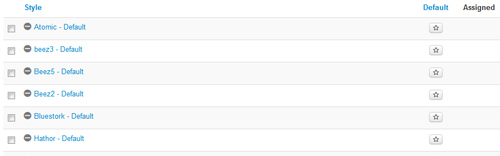
This template comes loaded with options that you can use to customize your site exactly how you want it. Here's how to get to these custom settings:
- In the backend of Joomla go menu item Extensions/Template Manager.
- Click on the title of the template.
- This will bring you to the template manager screen where you can edit the template's parameters.
- Click save when you are done
- Detalls
So what are Site Shapers? They are quick installs of Joomla combined with all the modules, content, etc used on our demo, excluding stock photography. Within a few minutes you can have your site up, running and looking just like our demo. No more importing SQL dumps and installing modules. Just head on over to the download section of this template and grab a Site Shaper. Simply install the Site Shaper like any other Joomla installation, it's that easy!
How to setup a Site Shaper
- Login to your cpanel or your server admin panel.
- Locate the area where your databases are (usually labeled Mysql Databases)
- Create a new database
- Next create a new database user and assign it to this newly created database in the previous step
- You will then need to extract the site shaper to either a folder on your server or the root directory such as WWW. NOTE: if you already have a website in the root of your WWW folder, we suggest creating a new folder and extract the site shaper there. If your cpanel does not have an extract option or you cannot find it, you may also extract the contents of your site shaper in to a folder on your desktop and upload all the files via an ftp client to your server.
- Next, navigate to the url where you extracted the site shaper via your web browser.
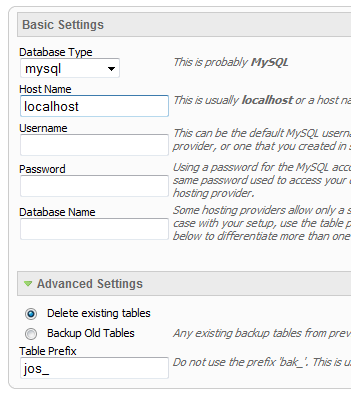
- Continue through each screen until you reach the below screenshot:
- At the above screen be sure to enter localhost as shown, continue to fill in the following text fields with your newly created database and username information
- Follow through the rest of the site shaper setup and click the install sample data at the last screen and the installation is complete! (be sure to rename/remove the installation directory after finishing the install)
- Detalls
This menu system works off of the core Joomla jquery/mootools scripts so no extra javascript library is needed and keep download sizes to a minimum. Also, if you do not want to use this menu you can simply turn it it off from the template configuration page.
Take your website to the next design level by using the robust and feature rich S5 Flex Menu System. Organize your links with ease and show content in places you never could before!
Menu Features:
- Automatic onclick functionality for tablet sized touch screens. If a device's screen is detected as touch screen and is of table size, then the menu will function with an onclick method rather than the onmouseover effect that is shown on a laptop or desktop that has a mouse for use.
- Multiple javascript effects such as fade, slide, etc.
- Multiple columns for menu items or modules.
- Modules load directly into the menu.
- Group sub menu items into the same column or fly out.
- Optional sub texts for each menu item.
- Optional menu icon images for each menu item.
- Automatic multi-language menu change. If you are setting up a multi-language site, the flex menu will automatically change if your site's visitor has a language specific menu setup for their language in the menu manager.
- And much more!
Menu Screenshot:

- Detalls
Note - If the responsive layout is enabled the drop down will disable when the screen size reaches 750px so that it does not interfere with the mobile menu bar

- Customize almost everything! Shadows, borders, gradient, opacity
- Contains 6 module positions drop_down_1, drop_down_2, drop_down_3, drop_down_4, drop_down_5 and drop_down_6
- Auto adjust to the height of your content
- Set your own open and close text
- Auto collapse if no modules are published to it
- And many more features!
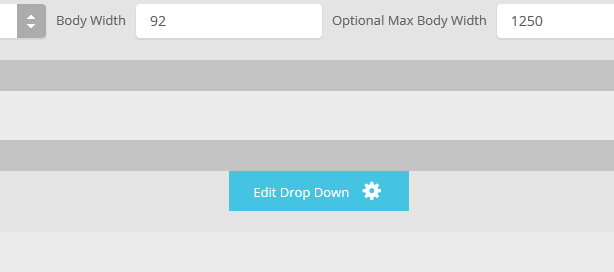
Screenshot of Drop Down admin in template configuration area: